Chrome for Android is one of the fastest and most feature-rich browsers for Android.
Step 1: Go to Chrome's Hidden Settings Menu
From Chrome's address bar, type chrome://flags and hit the enter key on your keyboard.
Step 2: Make the Following Adjustments
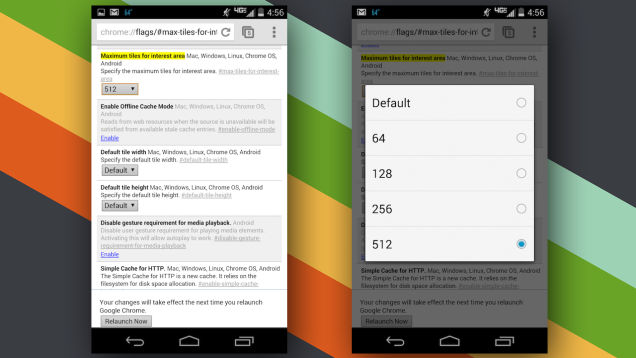
Tip #1: Set "Maximum Tiles..." to 512
Tip #2: Change the Number of Raster Threads
On the first highlighted result, tap the drop-down menu and select 4.
Tip #3: Enable SPDY/4
Type Enable SPDY in the search bar.
Tip #4: Enable Offline Cache Mode
Tap the Enable button just below the setting titled Enable Offline Cache Mode.
Tip #5: Enable Experimental Canvas Features
Type Enable experimental canvas and tap Enable once again.
Tip #6: Enable Experimental Websocket Implementation
This feature is a new way to handle web traffic communication.